Showing posts with label collaboration. Show all posts

Thursday, March 22, 2018

Interview with Shaunak Roy, Yellowdig - Innovators in E-Learning Series

People learn from each other and in online courses, the quality of interactions between students in their collaborative activities and with instructors is very important. Welcome to an interview with Shaunak Roy, founder and CEO of Yellowdig, a social learning platform that has been developed with the goal of enhancing the learning experience.

1.     What is your name and your relation to e-learning?
My name is Shaunak Roy, and I am Founder and CEO of Yellowdig, a social learning platform for education. I started Yellowdig with the fundamental believe that there is something magical about peer learning. Casual conversations, exchange of ideas, or occasional debates help form meaningful bonds with other learners, which make learning more fun, and real. As I look back into my own MIT and IIT days, I realize that I have learned as much from my peers as I have from my favorite professors. Some of those bonds have lasted well beyond those formative years and have morphed into lifelong friendships.

Shaunok on the video program, LifeEdge

2.     What is Yellowdig and what does it do? 
Yellowdig is a social learning platform that merges and combines the power of group learning and rapidly expanding real-time content from the internet into a seamless and easy to use learning platform. Yellowdig is Software as a Service (SaaS) that integrates into all Learning Management Systems (LMSs) and Portals to offer 1-click socially intuitive groups for a variety of use inside and outside of courses. For example, Yellowdig can be added in an individual course within minutes to offer a FERPA compliant, private and moderated collaboration forum for your course.


3.     How is it different than other collaboration apps?
The advantages of Yellowdig over other popular collaboration APPs such as Facebook Groups, Slack, and Yammer are the following :

·       1-Click Signup : Learners join the platform by clicking on a “Yellowdig” button in the Learning Management System (LMS), no separate registration required

·       Automatic grading and gradebook sync : Instructors can set up a points system to encourage learner participation, that is fully customizable from course to course.

·       Privacy and moderation : All the content remain private to a course and can be moderated by the Instructors and admins encouraging deeper and authentic participation.

·       Customization : There are many out-of-the-box and  custom configuration options available to support a variety of use cases and learning needs

4.     How are universities using the app? 
Yellowdig is bring used by over 40+ institutions and 140,000 learners across online, blended and residential courses and MOOCs.

5.     Many collaboration applications are not used in courses because they require so much extra time from the instructor.  How does Yellowdig approach that problem? 
We recognize that engaging students through prompt driven discussion and manual grading of discussion posts is a major time sync for instructors. In fact, this type of discussions tend to lower the quality of engagement as it feels less like organic sharing of ideas and more like assignments for the learner. Yellowdig, though peer driven discussion and automatic grading, substantially reduces instructor time commitment while improving both quality and quantity of engagement.

You can refer to our blog for many stories from instructors on how Yellowdig has helped them improve their instruction without increasing workload.

6.  What are your plans for the future?
We plan to continue to build our vision of making learning more engaging and real-world. We plan to add more features and data capabilities to help instructors and students get more from their learning experiences, from anywhere, at anytime and from any device. Our competitive advantage is our focus on working closely with our instructor community to co-curate the future of eLearning.

Check out Shaunak Roy on LifeEdge! https://youtu.be/SI-Y-bsHylg 


Tuesday, August 15, 2017

Free Canvas Tutorials for Instructors and Designers

Canvas is a virtual learning environment and also a learning management system that makes it easy to collaborate through its incorporation of Google Apps.


It is also ideal for individuals who would like to offer their own course, since individual accounts are free.

The flexibility of Canvas has made it the LMS of choice for MOOCs, and many universities are transitioning to it because it is easy to integrate and can be launched with a minimum of disruption.
 
I've put together two collections of video tutorials for Canvas. Here are six samples that I've uploaded into a YouTube playlist.

Here's the link to the playlist
https://www.youtube.com/playlist?list=PLfLhA1Ju1dqFLEW7B0HqPGapLH-BKhtJQ 

Here are the titles:
Planning and designing using learning objectives
 
Building collaborative presentations


Wikis

Learning through Collaboration


Assessment and Learning Objectives in Canvas
For More
Overview of the full Quick Start Guide to Canvas Video Course (with free sample):  35 modules / more than three hours of video guidance
https://www.packtpub.com/game-development/quick-start-guide-courses-canvas-video

 Overview of Canvas for Collaboration (with free sample) - 30 modules / 3 hours 10 minutes of instruction


Thursday, March 10, 2016

Interview with Srikant Vasan, SkillStore: Innovators in E-Learning Series

Finding ways to make skills training enjoyable, effective, and affordable continues to be a major challenge for organizations. SkillStore has tackled the challenge via social learning, and has deployed training that incorporates what we know about how people learn and gain confidence about themselves.

Welcome to an interview with Srikant Vasan, SkillStore. For a limited time, SkillStore is offering six free courses. The instructions are at the end of the article.

 1.  What is your name and your relation to e-learning?
My name is Srikant Vasan, and I've been working in e-learning for 7 years. In that time, I have served as a Senior Program Officer at the Bill and Melinda Gates Foundation and was their first Entrepreneur-in-Residence, where I had the opportunity to learn about the latest innovations in online learning. I was also the Founder and President of Mount St. Mary's Online College, a nonprofit online college (funded by leading donors including Bill Gates, Reed Hastings and the Walton family) focused on helping low-income Americans get quality college degrees affordably.


Srikant Vasan, SkillStore
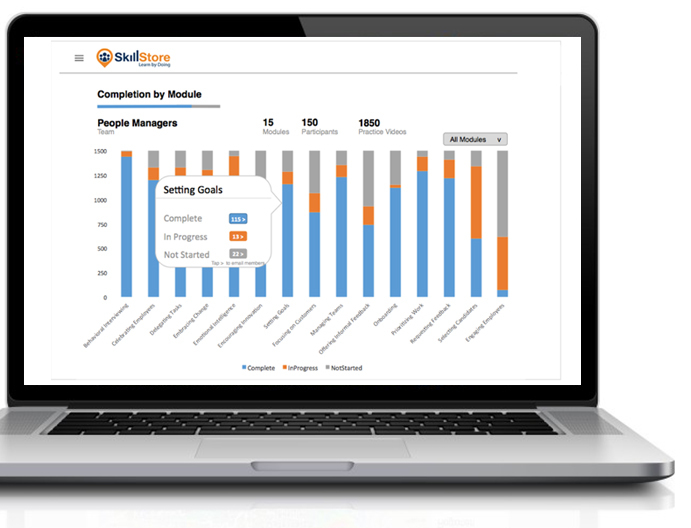
Now at SkillStore, we offer an effective and scalable soft skills training solution through our social-learning app. We launched the app last year, in collaboration with leading companies like Western Union and SAP. SkillStore’s approach to transforming soft skills training – where learners record their practices and get feedback from coaches and peers – is catching on. Users in over 40 countries now access SkillStore from their laptops, smartphones or tablets for leadership development, communications and management training.

2.  How did you become interested in elearning?
I became interested in elearning because of my background in both education and technology. Elearning is an effective and engaging tool to empower learners. Technology, especially mobile learning, is the future of training and development.


3.  What are some of the soft skills that most professionals need to have, regardless of their specialty?
People skills are critical. Research estimates that 85% of professional success is due to strong social skills. In particular, listening and observing others, effectively communicating, negotiating, and empowering others are essential to success in a professional environment. In a competitive business environment, managers are increasingly seeking employees who have strong people skills and can work well with others in the office as well as with clients.


4.  What causes much of the training that is offered in today's environment to be less than ideal?
Research estimates that about 80% of training is wasted, especially that focused on soft skills development. We think the root cause for this is that today’s training methods – both in-person and online – have severe shortcomings. These programs tend not to be engaging or effective. They typically focus on delivering content, but don't allow learners to practice the skills in real-life situations. Learners spend a lot of the day reading, watching videos, or listening to someone speak. They don't retain the material.

Additionally, instructor-led workshops are expensive, time-consuming, and hard to scale and standardize, and thus are not a realistic option for most organizations. Not to mention, millennials tend to hate long lectures and classroom settings. And web-based training typically offers few opportunities to practice these skills interactively and learn with other people in a social learning environment. People skills are best developed by practicing with other people.


5.  How is SkillStore.com helping?  What makes SkillStore unique?
SkillStore helps because it addresses skills that helps professionals succeed, such as emotional intelligence, running effective meetings, negotiating a promotion, and nonverbal communication. What makes SkillStore unique are the following features of its learning model.

•    Focus on practice. Consider that one week after a lecture, learners remember only about 10% of the information. Even after re-reading the material, one week later they will only retain 39%. If they practice these skills, the retention rate goes up substantially, to as much as 80%. Ideally, at least 50% of time training on any subject should be spent on active practice. Practice is one of the most fundamental aspects of skill development, yet it is likely the most overlooked element in corporate learning programs.

•    Enable feedback
. Practice and feedback go hand-in-hand for skill development. The best type of feedback involves observations and suggestions about a practice session, delivered in a candid, constructive manner. This includes self-evaluation (because watching yourself on video is incredibly instructive) and feedback provided by peers and managers.

•    Enable social learning. Social interaction creates richer experiences and increased application opportunities. With peer interaction and feedback, learners enhance their understanding from others’ experiences, approaches, and perspectives. This aspect of social learning leads to greater engagement with and effectiveness of training programs. An important side benefit is that learning together is a powerful community builder that helps to forge deeper relationships and a vibrant company culture.


•    Offer micro-learning.  Learning is more convenient and effective when offered in small chunks, especially with today’s hectic schedules. Even better is when learning is an ongoing, on-demand initiative available to managers when and how they need it. In a survey of learning professionals, 90% reported preferring more “bite-sized,” or micro-learning.

•    Let you learn anywhere. Millennials are now the largest generation in the workforce, so their preferences help define learning approaches for the future. They are tech-savvy and value flexibility regarding when and where they work and learn. They expect learning to be as accessible as a map to the nearest restaurant and available in the palm of their hands. This means fewer classrooms and schedules, and learning that can be accessed anywhere – on the Web, on smartphones, or on other mobile devices.

6.  Please describe a few of your favorite courses -- give an example of some unusual and beneficial things that happened in the courses.

It might makes more sense to describe some of the curricula. Leading Change has learning modules that help managers manage change in their organizations; Working in Teams has learning modules that develop strong professional teams; and Hiring the Best has learning modules that demonstrate best practices in hiring new employees. Our feedback from clients has been fantastic. One learner used the Negotiating Salary module in the Women in Leadership curriculum and then successfully negotiated a higher salary for herself. She said that before going through that lesson she never would have thought of asking for a higher salary.


7.  What are your plans for the future?
We believe SkillStore has the potential to transform leadership and management skills training at scale. We aim to become the leader in soft skills training programs that help organizations efficiently develop their employees' skills. We are just getting started and it will be exciting to see where we go from here.

SIX FREE COURSES NOW

All you need to do is to go to our website, and click the sign up free button.
http://skillstore.com/

To go directly to the sign up form, click
https://app.skillstore.com/get-skillstore-free

Wednesday, July 22, 2015

Using Web 2.0 in Online Courses: Creating Mystery & Engagement with a Collaborative Story Line

One interesting way to engage students is to put together a PowerPoint presentation that can be shared via social media, and which gives the opportunity to create a response presentation, and which includes a mystery / adventure story line.

In this case, which was for a basics of petroleum geology course, I created a six-slide PowerPoint presentation which I shared using Slideshare.  The story is based on a real-life class action suit in Oklahoma that had to do with the underpayment of oil and gas royalties. 

The learning objective was to discuss royalty payments on oil and gas production. 

To build the presentations, I used photographs I took in Istanbul as background graphics. I used cutout figures from eLearningArt.com, and I modified graphics using PicMonkey.com.  

I then uploaded it to SlideShare.com, and I shared the link via an email announcement in the course, which uses Blackboard. I encouraged students to post responses in the Discussion Board area.


http://www.slideshare.net/beyondutopia/underpaid-royaltiesconv

Here’s the concept and call for collaboration:

Incident in Istanbul: The Secret Files & the Case of the Underpaid Royalties 

Zounds! Maria has stumbled across secret files – they have information that shows that a midstream transportation company has been underpaying royalty owners by deducting line charges.
This could be one of the largest class action suits in her state’s history. But, she needs to explain the situation.

Help her explain what is going on and how oil and gas royalty owners are paid for production.
    Who is involved?
    Who pays the royalties? How much?
    How are the payments (and the deductions determined?
    When are they decided?)

We need your expert help! Please create a presentation that helps a royalty owner, or potential jury member (in the case of a Class Action lawsuit) understand what has happened, and also what kind of information Maria needs to collect.

***
This example was also used in an Instructional Design Certificate program (Rollins College) to provide an example of how simple storyline presentations can be used with Web 2.0 tools, and to boost engagement and collaboration.


Monday, August 12, 2013

Mind-Mapping and E-Learning: Interview with Yvonne Wu, MindMaple

Mind-mapping software has been used very successfully in courses where creativity and idea generation are critical, and where one might wish to discover (or uncover) connections and patterns. Mind-mapping can be conducted independently or collaboratively; the collaborations can be synchronous or asynchronous. Mind-mapping software is often very helpful and can be used in conjunction with elearning courses as well as in tasks and projects. MindMaple, a mind mapping software in both Windows and IOS operating systems, is unique in its flexibility and suitability for many different users, ages, and levels.


MindMaple.com Mind-Mapping Software
 Welcome to an interview with Yvonne Wu, MindMaple.

1.  What is your name and relation to e-learning?
My name is Yvonne Wu and I’m a member of the marketing team of MindMaple. I want to share my belief with all the educators and the readers of e-learning blog that the concept of mind mapping techniques can support or even enhance the education in many ways.

2.  What is MindMaple?  How does it work?

A mind map is a diagram that grows and elaborates around a central word, phrase or concept. Starting from a central topic, we add subtopics or subcategories to branch out the map; at the same time grow the ideas.

Mind map visually organizes your thoughts on the same surface. It’s like visualizing the thoughts in your brain that people can easily see and understand with one glance and be on the same page with you.

When the concept of mind mapping marries technology, voila! Here comes MindMaple! MindMaple, a mind mapping software works as a tool to optimize skill of mind mapping with technology. Teaching and learning then become more creative and interactive.


3.  Please describe three innovative uses of MindMaple in elearning for K-12, college, and professional development

in e-learning for K-12

•    Optimized the integration of left and right brain.
Our left brain majorly is in charge of tasks that are more analytic and logical; while our right brain processes most of the non-verbal tasks that require more creativity and imagination. Mind mapping is a useful technique integrating the functions of both left and right brain in the thinking process; while MindMaple, optimizes such skill with technology. It allows you to think logically; while at the same time retains or even boosts your creativity.

•    Stimulated curiosity and encouraged children to think outside of the box:
The motivation of learning starts from curiosity. Teaching and learning with mind mapping software is interactive which helps children to increase the brain activity and to remain curious.

•    Increased interest of learning for students with learning disability:
MindMaple allows teachers to add images, video clip, or to color code the map. This makes teaching lectures more interactive and can help students with attention deficit hyperactivity disorder (ADHD). Color coding and the nature of mind map that communicate with less word but more visual material can lower the learning barrier for students who have Dyslexia problem.


elearning for college
•    Making presentation more convincing: Either the lectures in class or student performing presentations for their projects, MindMaple visualize communication, which not only make the presentation more interactive, but also more convincing.

•    Planning and scheduling with MindMaple to enhance task management: Schools and teachers can use MindMaple to design the teaching plan, syllabus or school event planning. Task manager function in MindMaple also allows students or teachers to set up deadlines, to keep tracking task progress, or to distribute the resource and budget for better task management. 


•    Organizing ideas and thoughts: Mind mapping software enables students and teachers to think outside of the box; while keeping all ideas visually organized.  MindMaple can be an incredible asset in regards to learning and teaching in a creative, more efficient way. Teachers can use MindMaple for brainstorming sessions. Students can use it for notes taking and studying.


 elearning for professional development
•    When it comes to project management, MindMaple is extremely helpful organizing ideas and tasks with the functions of scheduling and task progress tracking. Project managers and event planners use MindMaple to plan and keep track of multiple projects with deadline.

•    Visual design related professions will find MindMaple helpful in the brainstorm stage. You plant the ideas, let MindMaple help it grow!

•    Journalists can not only use MindMaple to brainstorm and generate articles, but also to plan and schedule the editorial calendar of publication.

4.  What are some of the features that make MindMaple effective in the elearning space? 
•    Real-time collaborative function enables users to work on the same mind map at the same time. It helps the teamwork aspect of learning.

•    Task manager: including human resource allocation, task progress monitoring  and deadline scheduling.

•    Usability: MindMaple simplifies but amplify the whole mind mapping concept with the ease of usability. Our user friendly interface lower the barrier to access the idea of mind mapping. For example, with touch screen interface, users can easily create a mind map on their iPad by simply tapping a topic and draw out from existing topic; just like drawing a map with your hand!

5.  How might MindMaple be used for writing courses (essays, plus creative writing)? -- I'm thinking specifically of the invention stage.
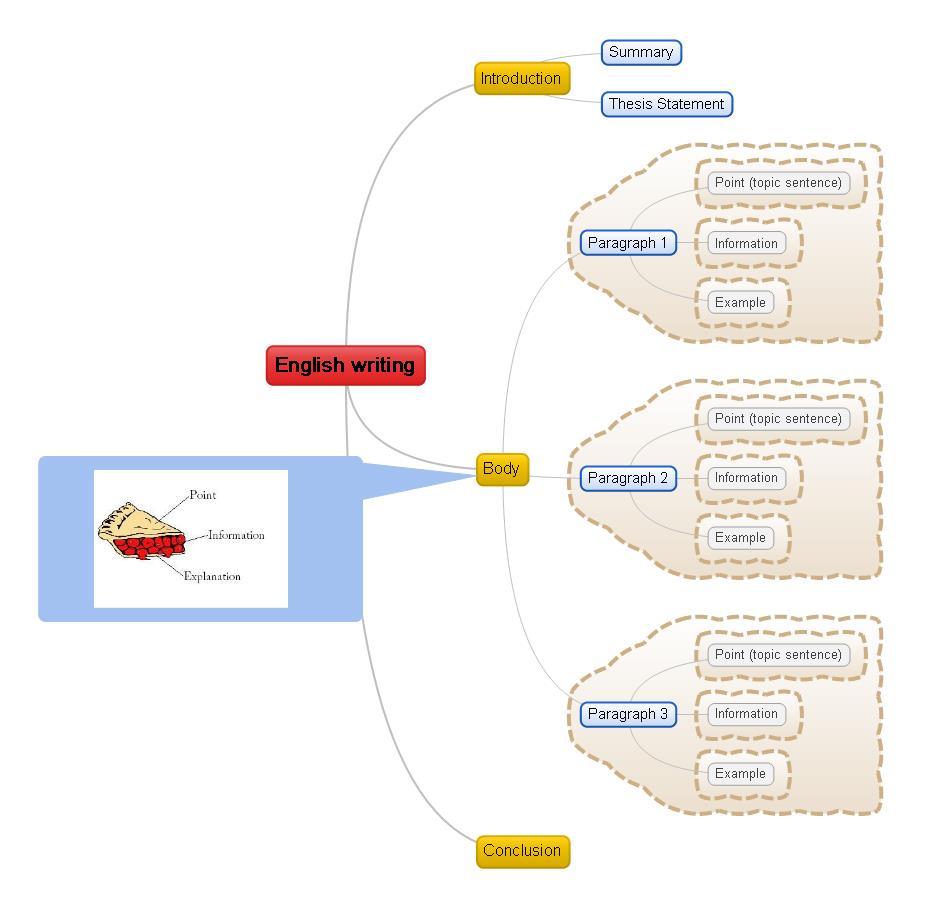
Mind mapping is a skill that grows and elaborates from one central idea or statement. This technique can seamlessly integrate with the process of writing. The central concept will be the topic or the thesis statement of an article. The next subtopic of the central topic stands for points that support the thesis statement. 


6.  Can you recommend three books?

•    The Defining Decade: Why Your Twenties Matter--And How to Make the Most of Them Now
•    Creating Magic: Enhance Your Life With Creativity
•    Mindset: The New Psychology of Success


Thanks for the interview! MindMaple strives to contribute in education by introducing this helpful mind mapping software. If there is any further questions, or if anyone would like to know more about MindMaple, feel free to reach out to me at Yvonne@mindmaple.com. Any suggestion on how we can help more in teaching and learning is appreciate as well!

Sunday, December 14, 2008

Interview with Gary Dietz, Elluminate -- Innovators in E-Learning Series

Welcome to an interview with Gary Dietz of Elluminate, a collaboration tool and platform that allows e-learning and training to bridge learning styles and to bring together diverse learners in effective, synchronous training that can be archived and used asynchronously.

1. What is your name and your relation to Elluminate?

My name is Gary Dietz and I am a Senior Product Manager for Elluminate. I am not the chief cook and bottle washer, but I cook and wash a lot of things.


2. What is Elluminate? What does it do? How does it work? Why do you believe in it?

Elluminate the company is focused on applying Internet technologies to help teachers and students teach and learn effectively, regardless of where they are. Elluminate is best know for Elluminate Live!, our main product.

Elluminate Live! maps the collaboration available in a physical classroom – things like talking, seeing one another, shared writing surfaces, break-out groups, shared web browsing, watching film clips – and delivers those same kind of highly interactive activities to groups of teachers and students regardless of whether they are in the same room, the same town, or a continent away.

Elluminate has other products that are concerned with planning for these live interactions, recording interactive sessions for later on-demand viewing, and for making Elluminate work with other eLearning environments like Blackboard and Moodle. I believe in Elluminate because after working in the real-time collaboration space for about 13 years, I have never seen a for-profit team so dedicated toward meeting the needs of a large swath of public and private educational needs.

3. What is the philosophy of Elluminate?

It sounds kind of corny, but our "No User Left Behind" philosophy really encapsulates what we all do every day in our roles at Elluminate. Yes, we are a for profit entity. However, we have a dedicated team of engineers, support staff, and marketing folks (many of whom have come from academia) listening to, and responding as best we can, to the needs of K-12, university, and corporate educators wherever they are and with whatever abilities they possess. Not only that, but for a small company, we have tremendous support for non-profit activities and organizations with over 100 organizations in our Community Partner Program such as NACOL, CIDER, LINGOs, CILC, and the NSTA. Also, our vRoom program allows free, unlimited use of a full version of Elluminate Live (limited to 3 connections at one time).

4. Who benefits from Elluminate? How? Why?

Students benefit from Elluminate, whether those students are K-12, university, adult, or professional learners. Look, it is easy to say that our product helps everyone who is exposed to it, but I won’t do that. What I will do is say that if you have a learner who is motivated (by themselves or their support system), the Elluminate Learning Suite of products will allow instruction to occur in many places and in many ways that would not have been possible without Elluminate. Do we do that alone? Of course not. But with teachers, administrators, parents, and public servants who realize that education needs to change, together we can learn what works best and implement best practices that bring true collaborative learning to more people in more places in ways equal to or better than traditionally available. And many times, at lower cost.


5. What differentiates Elluminate's products from free video conferencing with, say, Skype?

At the 41,000 foot level, most "real time collaboration" products connect people. How they do it, why they do it, whom they are doing it for, and in what context it is deployed is the difference.

At the top level, here are a few things. The Elluminate Learning Suite was designed with pedagogical tools specific to teachers and learners. Not as a consumer video chat tool (such as Skype, which is a great product and I use too) or a business to business "slideware plus phone" product like many other real-time tools on the market.

And it isn’t just the tools, it is the infrastructure. The Elluminate Learning Suite integrates into the way K-12 and University learning programs are designed – from single login to CMS/LMS centered to being able to handle dozens or hundreds of people in a session. And how the deployments are supported and how PD is provided is a major differentiator for an education focused company like Elluminate.

6. How does Elluminate encourage students and instructors to interact?

Elluminate as a company introduces features and free or for-pay professional development that critically examines best practices on how to use our, and others’, tools in classrooms with various constituencies. So, whether it is our free live or recorded moderator training, our free vRoom program, our free, regional Elluminate Community Conferences for face to face sharing, our Product Advisory Councils, our Centers of Excellence program, or the many free webinars we run every quarter, Elluminate is all about interaction between and amongst professionals and helping them interact better with their students. eLearning tools can be, but needn’t be, cold, monolithic, and inhuman. In fact, working exclusively online with student, teachers, administrators, and community members can, when done correctly, provide interaction that is likely more interactive than even face to face.

Let me use an example. Suppose a learner’s English skills are not as good as some of his or her classmates. By being able to participate online in real time not only are some of the "fear" barriers lowered, but additional channels of text chat, possible second language real-time closed captioning, and the ability to record and review later are available in ways that may not be so easily be made available solely in a brick and mortar classroom.

In my personal experience, groups of people who are too scared to ask questions in a brick and mortar classroom are more than willing and able to ask, via text chat or hand-raising in a virtual session.


7. Where and how does your vision encourage creativity, innovation, and leadership?

Our executive leadership is extraordinarily interested in changing the world through education. This is reflected in the makeup of our team and in our ability to address customer needs in ways that companies of a different size or a different vision would not be able to do. Don’t confuse that with lack of desire to be profitable. We certainly have achieved that and continue to require that. But profitability in this space is not achieved through myopic micromanagement or selling stuff that doesn't solve problems. It is achieved by unleashing people at all levels in the organization to solve small and large customer challenges. Our vision is to change the educational landscape, and we need to both listen to mavericks and lead them as appropriate.

8. Here's an extension of the previous question -- How can Elluminate help rebuild America / the world?

That’s a broad question, and I’ll make it even broader and rephrase a bit. We are an international company and we want to be part of the solution space of the challenges we have in delivering education to young students, engage university students, enhance adult learners opportunities, and bring lifelong learners new opportunities to enrich their lives. We strive to make a difference on a global level, particularly in areas where opportunities for communication, collaboration, and education have been sorely lacking.

Our Fire and Ice initiative demonstrates this quite dramatically. As far as the US is concerned, our focus on accessibility, in particular, addresses the No Child Left Behind initiative in a very powerful way. In fact, in South Carolina, where it’s now mandated that a distance education program contain 25% face-to-face learning, Elluminate has been recognized as meeting that requirement.

Only by distributing instructional excellence in better ways to places it already exists and by bringing instructional excellence to places it has never been will we together make the world a better place.

Blog Archive