Showing posts with label development. Show all posts

Wednesday, October 14, 2015

Multi-Disciplinary Mini-Competency Certificate Programs: Unique, Customized, with Real-World Value

The problem with most degree and certificate programs is that they tend to be expensive, cumbersome, slow-to-acquire, and uniform. And, it may be difficult to show you have knowledge in a unique area, say, “Geochemistry and Corrosion Control in Carbonate Reservoirs,” or “Fire-Themed Festivals for Economic Development.”

While uniformity can be good for a general education and for obtaining grounding in basic skills, it’s not good if you’re trying to differentiate yourself from the competition, and also to showcase what makes you uniquely you.

Further, if you’re trying to create a career path that is unique and explores interesting new areas, you will need to acquire a range of skills and abilities that cross categories, and which encourage you to think of things in new ways, and to relate different areas to each other.

You’ll also need to combine traditional learning activities (courses, elearning, projects) with prior learning and what you learn in teams and by applying concepts in order to solve a problem.

A way to give individuals an edge in a competitive job market is to develop a multi-disciplinary certificate that shows multi-competencies (which is to say that these are blended competencies). Customized, personalized curriculum in more than one discipline, can help the individual  transcend the limitations of conventional education and training, and to position oneself to enter unique employment areas, and also to apply knowledge in new and satisfying ways.

By making sure that the mini-competencies are flexible and quick-to-complete (as quickly as a month), it’s possible that a person will be continually creating and recreating himself or herself in a way that could be truly breakthrough in terms of human capital and a community’s ability to achieve sustainable growth.
Combine Courses with Collaboration, Applications, Demonstrated Knowledge
Learning is more than taking courses in a face to face or online setting. However, it’s easy to lose sight of that when we confine ourselves to traditional curriculum, and only track traditional coursework.

Instead, we need to find a way to officially track the knowledge that is gained in on-the-job or mentored learning, and also in teams. We also need to track what happens when the knowledge applied and shared, as in during a presentation or demonstration of a new product or process.

So, we need to make sure that we include learning events and we do it in a systematic way in order to establish quality standards and rubrics.

Incorporate Multiple Categories of Learning
To begin, let’s create categories of learning, and assure that there are measurable outcomes in order to successfully complete each one.

1.    Training/Education: Discipline 1 – include measurable outcomes (quizzes / questions / problems)
2.    Training/Education: Discipline 2 – include measurable outcomes (quizzes / questions / problems)
3.    Experiential Learning: Supervised work / mentored experience, with measurable outcome as the end product (map, report, video, etc.)
4.    Collaborative Learning: Project-based work that addresses solving a problem or investigating an emerging topic, with an outcome that could include a portfolio (joint report, video, audio)
5.    Application / Demonstration:  A paper or product / process demonstration presented at a refereed conference, convention, workshop, or symposium

Example -- Geochemistry and Corrosion Control in Carbonate Reservoirs:

1.    Face to Face Short Course in Discipline A (Engineering):  Corrosion in Mississippian Wells
2.    E-Learning Course in Discipline B (Geology):  Geochemistry of the Mississippian Lime in Oklahoma and Kansas
3.    Internship / Research Project: Talk to oil field chemical companies and discuss the different problems that occur with produced water in the Mississippian Lime (where / how / when)
4.    Attend Conference / Discussion Group (which requires interaction):  Attend an SPE Discussion Group in which corrosion control and production problems are discussed, create a report of what was discussed, along with initial literature review
5.    Make a presentation at a conference / workshop / convention: Present a paper on “The Relation between Geochemistry, Corrosion, and Declining Production in the Mississippian Lime”


Propose Your Own Curriculum, Get Sign-Off from the Sponsoring Organization
The first step is to identify your interests, and then to select learning experiences that fit the correct categories.

The sponsoring organization will provide guidance, will help identify learning experiences, will identify subject matter experts, and will issue certificates, and will archive the records.

As you complete each learning experience, you’ll provide the required documentation to the sponsoring association and then they will review and approve them (under the auspices of a subject matter expert).

The association will issue a certificate for each learning experience successfully completed, and then a certificate for the entire mini-competency. They will also collect recommendations which you can post in social media sites such as LinkedIn.

The Flexible Future of Self-Defining Competencies and Professional Identity
Organizations that are willing to work with each other and cross disciplines will be taking the first step to helping their constituencies and their communities in the development of human capital.

Key is to this is respecting the fact that individuals must find ways to differentiate themselves from others, and to customize themselves to build on their strengths and interests.




Wednesday, August 12, 2015

Infographics as Working Memory Boosters & Engagers for Learning

Infographics can serve a unique purpose in an online course or training program in that they both engage learners and provide a very handy mnemonic which assists in the storing and retrieving of information.

Infographics are easily incorporated into courses, and can be deployed via social media and within learning management systems. Further, it is a simple process to store your infographic in a cloud-based repository such as SlideShare (slideshare.net) which allows links, embeds to an easily downloaded pdf, along with allowing you to share accompanying notes and information.

For an audio recording, click here.

Here are two examples which were used for the petroleum industry, where it is often challenging to communicate information cogently and without clutter.
http://www.slideshare.net/beyondutopia/geology-and-engineering-mustknow-realities-for-reservoir-development

Geology vs Engineering Reservoir Realities
http://www.slideshare.net/beyondutopia/geology-and-engineering-mustknow-realities-for-reservoir-development
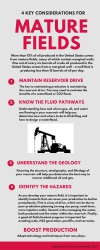
http://www.slideshare.net/beyondutopia/four-key-considerations-for-mature-fields
 4 Considerations for Mature Fields
http://www.slideshare.net/beyondutopia/four-key-considerations-for-mature-fields

Working Memory and Infographics
Baddeley and Hitch (1974) described the mechanism used by short-term memory as a process they denoted as “working memory.” In their view, working memory is a process driven by the “central executive” which collects, temporarily stores, and directs data to the cognitive subsystems of the a) visuo-spatial sketch pad, and the b) phonological loop.

As a highly visual artifact with engaging and unique organization of visual information, an infographic is an ideal tool for facilitating the smooth functioning of working memory.

The central executive can easily incorporate a well-designed infographic in the visuo-spatial sketch pad, which is, in essence, the inner eye.  The visual spatial sketch pad not only functions in the retrieval process, it also is used in navigation – in locating spatially where information might be.

The central executive takes and replaces information in the visuo-spatial sketch pad, and then relates it to long-term memory. The central executive can move material back from long-term memory to working memory, so the infographic can be used not only to store new information, but as a memory-trigger to retrieve information from long-term memory.

Baddeley emphasized that the central executive also functions as a system to keep attentional processes engaged, and to continually organize and prioritize (McLeod, 2012). It can also relate processes together, so that a infographic that is primarily attached to the visuo-spatial sketch pad, also can be related to the phonological loop processes.

Guidelines for Developing Infographics for Working Memory

1.  Keep your information tied to one or two categories 
2.  Use a clear color scheme
3.  Avoid clutter
4.  Maintain a minimal main message
5.  Connect / refer to details (don’t include all the details in the infographic)
6.  Use colors, white space, lively design
7.  Use phone, tablet, and laptop-friendly hosting / delivery
8.  Make your infographic multi-purpose, reusable
9.  Encourage sharing / comments / collaboration

Tools for Building Infographics
Infographics were originally designed almost exclusively by graphic designers, but now there are a number of free and premium services that provide cloud-based services that include professionally designed templates which utilize unique graphics, layouts, and fonts.

Examples include:

Canva (www.canva.com): Templates and unique fonts / images for infographics and presentations.

Piktochart (www.piktochart.com): Templates, images for infographics, reports, presentations

PicMonkey (www.picmonkey.com): Photo-editing that also includes a number of unique fonts, images, and clip art, and easy creation of collages that can also be designed as infographics

Final Thoughts
Infographics can be very practical as well as engaging and fun. For example, if you save them as a pdf files and print them out, you may use the infographics as a point of departure for an impromptu mind map.

The key is to design with an eye to inspiring and triggering thoughts – about the present, past knowledge, and collaborations. Used well, infographics can be an effective tool for deep learning.

References

Baddeley, A. D., & Hitch, G. (1974). Working memory. In G.H. Bower (Ed.), The psychology of learning and motivation: Advances in research and theory (Vol. 8, pp. 47–89). New York: Academic Press.

Baddeley, A. D., & Lieberman, K. (1980). Spatial working memory. ln R. Nickerson. Attention and Performance, VIII. Hillsdale, N): Erlbaum.

McLeod, S. A. (2012). Working Memory. Retrieved from www.simplypsychology.org/working%20memory.htmlwww.simplypsychology.org/working%20memory.html

Saturday, March 15, 2008

Stephen Downes on Web 2.0

This video presentation by Stephen Downes on how to use Web 2.0 as a part of one's continuous, ongoing learning and development process is quite good. It has been up for awhile, but I just happened upon it and wanted to draw attention to it and to share.

http://video.google.com/videoplay?docid=-5431152345344515009&hl=en

Stephen Downes Video


Among the things I find engaging are the points about how people interact using Web 2.0 applications, and how information flows.

Visit Learner Institute.

Blog Archive