Showing posts with label infographic. Show all posts

Saturday, September 03, 2016

Review of Visme: Presentations, Photo Editing, Animations

I'm reviewing the free version of Visme (http://www.visme.co/) because I stalled around and let my free trial to the premium version expire before I had time to really work with the program.

There are quite a few sources of presentation templates and infographic software, and many are free. So, how does one wade through and finally decide which one to use? I like the idea of using quite a few of them.  Just for fun, I thought I'd create a collage with a few photos that I took along with some of the shapes in the Visme library of free items.

In order to use the graphic, I had to save it and then download it. With the free version, I can download a jpg graphic. But, with the  premium, I can save it as the following file types: PNG, PDF, and HTML5.

Visme graphic I created using the free version and playing with Visme's shape library and a few photos I took in Mexico.
Visme offers infographics, but most come with the premium version. If I had the premium version of Visme, I might prefer it. But, at the moment, my favorite infographic cloud-based software program is Canva (https://www.canva.com/). It is easy to use, and the built-in template give me endless inspiration and ideas. As with all infographics, planning is the most important part. What do you want to communicate? What is your message? Why do you need to communicate the message in infographic form? What are your advantages?

After you've determined what your purpose is and what you want your reader to do with the information (the famous "rhetorical situation"), you can start taking the next step.

Canva is great for infographics, and it also has presentations. But, so does Google slides. And, for that matter, PowerPoint's many online repositories can provide you with templates.

So where does Visme fit in?  To me, what makes Visme really special is what lies beneath the first slide -- in the depth and breadth of the presentation templates, and that they are very easy to animate.

They can also be connected to Screencast-o-matic for excellent and easy-to-make audio-accompanied screencasts.

But returning to Visme -- here are a few of the advantages: 
  1. Visme's tools are very professional and allow you customize more than you can with some of the other templates and interfaces
  2. The photo editor is very easy to use and powerful
  3. The font library is fun and very extensive
  4. The banners are perfect of quick construction of banner ads for placement on websites
  5. The simple charts and graphics within the infographics section are extensive. They're not free, though. 
How much does Visme cost?  Right now, there packages for free, $7 per month, and $15 per month. If you're a designer and you use Visme to build ads, etc. the price is certainly worth it.

I personally think that Visme would be a better solution if it also included a library of cut-out characters. It's really a pain to have to subscribe to five or six different services just to create the kinds of instructional or promotional materials that you want / need to create.

Here's a social media graphic (using the premium version) that I assembled using photos from Pawnee, Oklahoma, where a 5.6 earthquake in September 2016 impacted historical buildings, some much more than others.


That said (and all whining for a utopian solution aside), I like using Visme, and love the results. Here's just one experiment -- photos taken in Mexico and in downtown Tulsa on Cinco de Mayo 2016 at the Chihuahua races :) :)


Wednesday, August 12, 2015

Infographics as Working Memory Boosters & Engagers for Learning

Infographics can serve a unique purpose in an online course or training program in that they both engage learners and provide a very handy mnemonic which assists in the storing and retrieving of information.

Infographics are easily incorporated into courses, and can be deployed via social media and within learning management systems. Further, it is a simple process to store your infographic in a cloud-based repository such as SlideShare (slideshare.net) which allows links, embeds to an easily downloaded pdf, along with allowing you to share accompanying notes and information.

For an audio recording, click here.

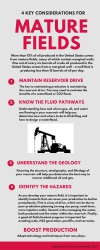
Here are two examples which were used for the petroleum industry, where it is often challenging to communicate information cogently and without clutter.
http://www.slideshare.net/beyondutopia/geology-and-engineering-mustknow-realities-for-reservoir-development

Geology vs Engineering Reservoir Realities
http://www.slideshare.net/beyondutopia/geology-and-engineering-mustknow-realities-for-reservoir-development
http://www.slideshare.net/beyondutopia/four-key-considerations-for-mature-fields
 4 Considerations for Mature Fields
http://www.slideshare.net/beyondutopia/four-key-considerations-for-mature-fields

Working Memory and Infographics
Baddeley and Hitch (1974) described the mechanism used by short-term memory as a process they denoted as “working memory.” In their view, working memory is a process driven by the “central executive” which collects, temporarily stores, and directs data to the cognitive subsystems of the a) visuo-spatial sketch pad, and the b) phonological loop.

As a highly visual artifact with engaging and unique organization of visual information, an infographic is an ideal tool for facilitating the smooth functioning of working memory.

The central executive can easily incorporate a well-designed infographic in the visuo-spatial sketch pad, which is, in essence, the inner eye.  The visual spatial sketch pad not only functions in the retrieval process, it also is used in navigation – in locating spatially where information might be.

The central executive takes and replaces information in the visuo-spatial sketch pad, and then relates it to long-term memory. The central executive can move material back from long-term memory to working memory, so the infographic can be used not only to store new information, but as a memory-trigger to retrieve information from long-term memory.

Baddeley emphasized that the central executive also functions as a system to keep attentional processes engaged, and to continually organize and prioritize (McLeod, 2012). It can also relate processes together, so that a infographic that is primarily attached to the visuo-spatial sketch pad, also can be related to the phonological loop processes.

Guidelines for Developing Infographics for Working Memory

1.  Keep your information tied to one or two categories 
2.  Use a clear color scheme
3.  Avoid clutter
4.  Maintain a minimal main message
5.  Connect / refer to details (don’t include all the details in the infographic)
6.  Use colors, white space, lively design
7.  Use phone, tablet, and laptop-friendly hosting / delivery
8.  Make your infographic multi-purpose, reusable
9.  Encourage sharing / comments / collaboration

Tools for Building Infographics
Infographics were originally designed almost exclusively by graphic designers, but now there are a number of free and premium services that provide cloud-based services that include professionally designed templates which utilize unique graphics, layouts, and fonts.

Examples include:

Canva (www.canva.com): Templates and unique fonts / images for infographics and presentations.

Piktochart (www.piktochart.com): Templates, images for infographics, reports, presentations

PicMonkey (www.picmonkey.com): Photo-editing that also includes a number of unique fonts, images, and clip art, and easy creation of collages that can also be designed as infographics

Final Thoughts
Infographics can be very practical as well as engaging and fun. For example, if you save them as a pdf files and print them out, you may use the infographics as a point of departure for an impromptu mind map.

The key is to design with an eye to inspiring and triggering thoughts – about the present, past knowledge, and collaborations. Used well, infographics can be an effective tool for deep learning.

References

Baddeley, A. D., & Hitch, G. (1974). Working memory. In G.H. Bower (Ed.), The psychology of learning and motivation: Advances in research and theory (Vol. 8, pp. 47–89). New York: Academic Press.

Baddeley, A. D., & Lieberman, K. (1980). Spatial working memory. ln R. Nickerson. Attention and Performance, VIII. Hillsdale, N): Erlbaum.

McLeod, S. A. (2012). Working Memory. Retrieved from www.simplypsychology.org/working%20memory.htmlwww.simplypsychology.org/working%20memory.html

Blog Archive